
Introduction
Cover: visual suggestion – Module4-Unit4-Lesson3-Banner
Video helps make your stories more vivid and emotional. Even with just your phone, you can shoot and edit a beautiful, professional-looking video.
The main thing is to know a few simple filming rules and use convenient free editing apps.
In this lesson, you will learn how to record, edit, and publish videos for your stories on social media and blogs!
Basics of Video Shooting
Basics of Video Shooting
Before you start recording, think about what you want to show and who your audience is.
A video is also a story, so it’s important to plan its beginning, middle, and end.
Even a simple clip will look much better if you keep your camera steady and film in good lighting.
5 Simple Rules for Good Video Shooting
- Hold your phone horizontally (for social media and YouTube) or vertically (for Stories and Reels).
- Check the lighting before you start: natural daylight works best.
- Don’t film against a window or the sun.
- Try not to move your phone while recording — keep your hands steady.
- Film short clips (10–20 seconds) so that editing is easier later.
Interactive Task (Quiz, three Questions)
How to Edit Videos on Your Phone
How to Edit Videos on Your Phone
Once your video is recorded, you can make it more interesting — trim it, add music, text, or transitions.
You don’t need a computer for that — a free app on your smartphone is enough.
3 Free and Easy-to-Use Video Editing Apps
1. CapCut
- Available for Android and iPhone.
- Has a simple interface, many free music effects and transitions.
- Allows you to quickly create videos for Instagram, Facebook, and TikTok.
2. InShot
- Easy to use and has a free version (with a small watermark).
- You can trim clips, add music, text, and filters.
- A great choice for beginners.
3. VN Video Editor
- Professional in features but simple to use.
- Includes ready-made templates, audio, subtitles, and transitions.
- No watermarks and supports various formats.
Tips
- Save your videos in “HD” or “1080p” quality — they’ll look much better.
- If there are other people in your video, make sure they agree to it being published.
- Add short text or subtitles, so your story is understandable even without sound.
How to Edit a Video on Your Phone Using CapCut
How to Edit a Video on Your Phone Using CapCut
CapCut is a free mobile video editor that works on both Android and iPhone.
It has a simple interface, supports multiple languages, and allows you to quickly create beautiful clips for Instagram, Facebook, YouTube, or TikTok.
Scroll through the presentation to better understand how to use this app
How to Edit a Video on Your Phone Using CapCut
CapCut Tutorial for Beginners | Easy-to-Follow Steps
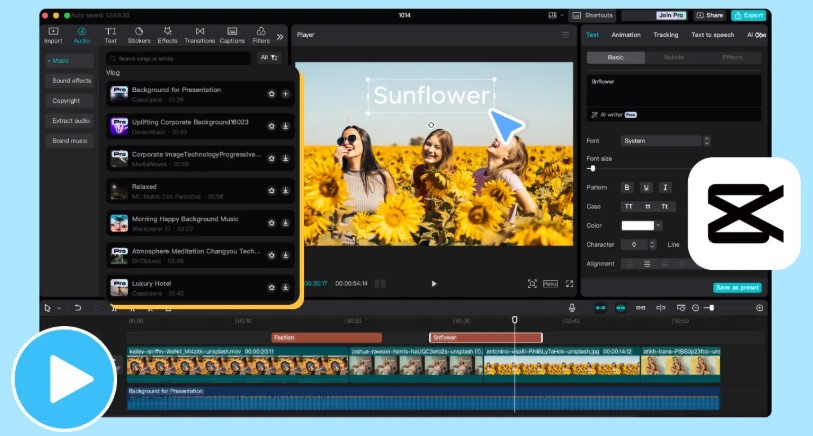
Link: www.capcut.com/
Summary
Now you know how to shoot and edit videos right on your phone.
The main thing is — don’t be afraid to experiment and create your own stories!
Remember: video is not only about technology, but also about the emotions you share with others.
Practical task
- Record a short video (up to 20 seconds) about something that inspires you.
- Edit it in CapCut, InShot, or VN Video Editor.
- Add text and music — and share it with your friends!
